Free offline XLSX · gift-set and craft-kit planning
Two bundles can use the same stock twice.
Add the demand for shared components across every planned set before comparing it with the stock available to this plan.
No email, account or payment. 10 bundles, 20 components, 60 bill-of-materials lines. Whole EACH units only. Created with AI assistance.
Start with one shared physical supply
A box used by Small and Large sets must have the same component ID. If you copy that box stock into two independent supplies, the workbook cannot know you counted the same units twice.
Count usable units and exclude damage. If your count still includes stock already committed elsewhere, enter that amount once in Reserved outside. If you already excluded it from usable stock, enter 0 outside. Do not subtract a commitment twice.
A fictional 2-box shortage
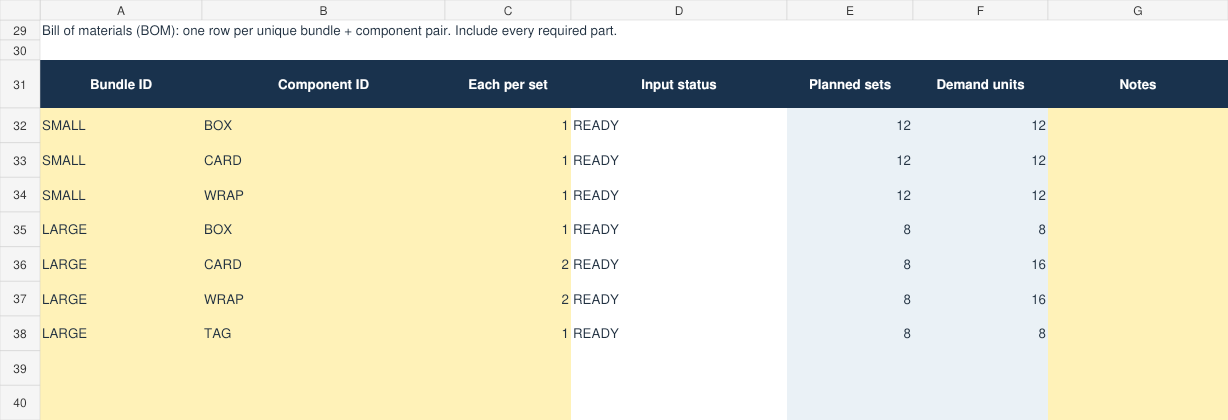
Small: 12 sets, each with a box, a card and a wrap. Large: 8 sets, each with a box, two cards, two wraps and a tag. Total demand is 20 boxes, 28 cards, 28 wraps and 8 tags.
25 usable boxes minus 7 reserved outside leaves 18 for the plan. The combined demand is 20, so the plan is short by 2 boxes. A stock-only check on each bundle separately would miss the combined commitment.
| Component | Net for plan | Combined demand | Short units |
|---|---|---|---|
| Box | 18 | 20 | 2 |
| Card | 50 | 28 | 0 |
| Wrap | 30 | 28 | 0 |
| Tag | 10 | 8 | 0 |
Reducing Small to 10 clears this example's entered-stock shortage. That is not an optimized mix or a recommendation to prioritize one customer over another.
How to use the workbook
- Read the example and verify the tool fits a single stock snapshot in whole units.
- Enter usable component stock and outside reservations.
- Enter every bundle's planned quantity. A known zero is 0, not a blank.
- Enter a unique bundle/component pair for every required part, including packaging and inserts.
- Fix missing values, invalid counts, duplicate IDs and duplicate pairs.
- Review shortages by component. Verify a complete BOM and physical counts before promising the plan.
Input state READY means the entered structure can be calculated. WITHIN ENTERED STOCK is not a physical count, customer reservation or guarantee that no part was omitted. A component you never entered cannot be discovered automatically.
What's included and what isn't
The kit contains an XLSX with blank, fictional-example and Read me tabs, three example CSVs, a one-page checklist, README and internal-use licence.
No macros, live inventory deductions, store connections, dated reservations, incoming purchase assumptions, cost/pricing, nested kits, substitutions, unit conversion, waste factors, allocation priorities or optimizer. After actual production or sales, update the real inventory system separately.
Formula/reference checks and a LibreOffice open/recalculate/save test were completed. Native Excel, Google Sheets, mobile editing, independent maker use and physical printing remain unverified.
Compare the existing alternatives
AnyTool already offers a free multi-bundle consumption planner. Shopify documents live component-based bundle availability for eligible stores. Stocksmith provides broader paid inventory and BOM workflows. Our narrower editable offline file is free; it is not a unique invention or a substitute for live synchronization.
Get the free workbook and checklist
Published October 18, 2026. No customer savings, sales or fulfilment outcomes are claimed.