Free workbook · completed monthly hour grants
Which month's retainer hours are left?
Keep each original grant separate. Check what was used, what expires at month close and what remains under your agreed rule.
No signup or payment. One client, 12 completed calendar months. English. Created with AI assistance.
Use this only when the rule fits
This workbook assumes one grant at the start of each calendar month, the same 1-12-month life for every grant, oldest-first consumption and expiry after the last month's usage. The default 3 is fictional: original month plus the next two months.
Not supported: opening bank, carry caps, borrowing future hours, changing expiry rules mid-history, daily or mid-month cutoffs, negative adjustments, refunds or invoicing. Start with the earliest relevant original grant; never collapse old hours into a new grant. If the original history no longer fits 12 months, use a longer ledger or dedicated system.
One fictional example
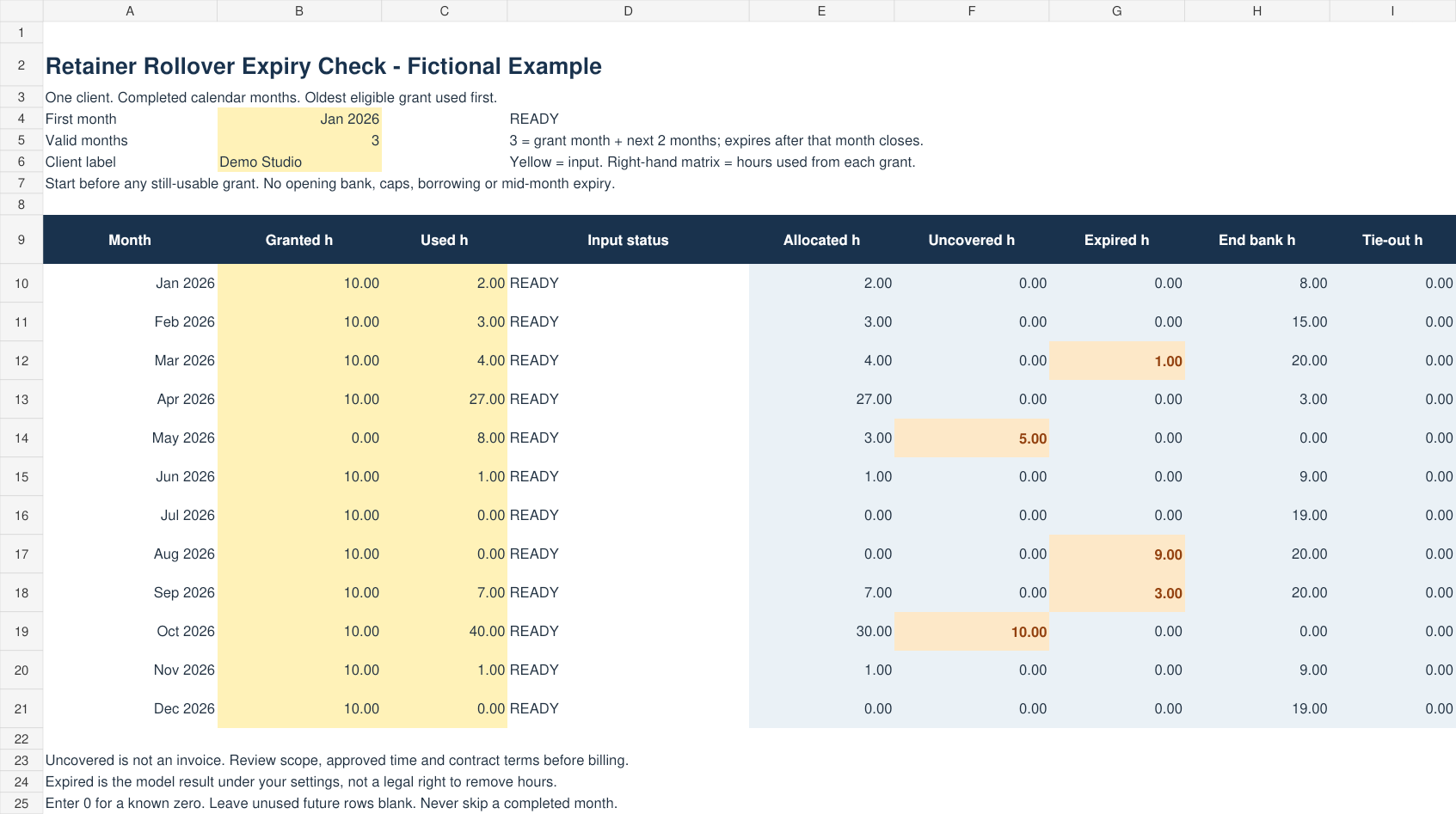
January, February and March each grant 10 hours. Usage is 2, 3 and 4. With a 3-month life, the January grant funds all 9 used hours. Its final 1 hour expires after March's usage. The bank ends March at 20 hours.
April grants 10 and uses 27: 10 from February, 10 from March and 7 from April. May grants 0 and uses 8, but only 3 are eligible. The other 5 are uncovered. Uncovered hours are not automatically billable. Check approved usage, scope and the agreement.
Six steps for a monthly review
- Check the agreed expiry rule and whether this model fits.
- Set the first month to the first day of the earliest relevant original grant month.
- Set Valid months. 1 means no carry; 3 means original month plus two.
- Enter granted and approved used hours for consecutive completed months. Zero is 0; unknown is not zero. Leave future rows blank.
- Review allocated, uncovered, expired and remaining hours. Scroll right to see the Grant 1-12 allocation matrix.
- Compare with original time logs and terms. Keep a dated copy before correcting past months.
READY means the row's inputs can be calculated. It does not authorize billing or prove a contractual right to expire hours. Tie-out checks arithmetic only.
Inside the download
- XLSX: blank Expiry Check, fictional Worked Example and Read me.
- CSV of the 12 fictional monthly inputs.
- One-page checklist, README and internal-business-use licence.
No macros, automatic data connections, client uploads or messages. Native Excel, Google Sheets, mobile editing, physical printing and independent target-user use have not been verified. The formulas and example were checked against an independent event-ledger model and LibreOffice recalculation.
Compare the alternatives
Freshlance offers a free single-period tracker with rollover as an input. Ardent Workshop offers a broader paid retainer workbook. Productive documents commercial rollover software, including deficit carry-forward that this workbook does not model. Check which rule and workflow you actually need. These listings do not establish demand for our file.
Get the free workbook and checklist
Published October 17, 2026. Arithmetic support, not contract interpretation, accounting advice or an invoice.